Make things together
Work in an invited browser room or a Discord channel session. Each has its own access rules.
Understand shared roomsBring your ideas, your files, and your people.
Research, build, and play with Ergod—on your own or in a shared room.
Free to start · No card or install · See a recorded result →
From the release notes
The dashboard and this website share one new look, a new start screen lets you begin on your own or in a room, and replies get to the answer sooner.
Read the updateGetting started in Discord is less repetitive, Free accounts can share across Discord channels, a friend can join your game table, and Account gives you a way to end browser sign-ins.
Read the updateSee when Ergod is waiting for a response or preparing its next action, with more reliable parallel work and reusable starting points for document tasks.
Read the updateWhat it does
Ergod brings tools, code and useful context to the conversation. Make something for yourself, work on it with a group, or open a game together.
Work in an invited browser room or a Discord channel session. Each has its own access rules.
Understand shared roomsWrite and run code. Make a page, a script or a tool, then ask for a change.
See recorded buildsOpen a game table for chess, a quick round or a party game, on the web, in Discord or in Telegram. Table access is separate from work rooms.
Find a gameSearch the web, compare sources and turn what you find into a useful brief.
Research and compareBring in material, create new files and reopen work in its workspace.
Files and linksSave preferences and project context in memory you can inspect and manage.
How memory worksStart in your browser. Hosted Ergod runs in the cloud, and you can also use it through Discord or Telegram. Connect more tools through MCP, link GitHub or schedule work you want to repeat: see connections and the developer guide.
Where you use it
Start on your own, invite people into a browser room, or talk to Ergod in Discord. Step through an illustrated view of each below.
Invite people into a room with its own conversation and files. Work on a plan, build something for the group, or pick up an idea together. Opening a room takes a paid plan; people you invite join free with a code.
A small plan. Room for everyone.
Friday · Sam would miss this one.
Make it. Change it. Come back.
Ask for a page. Try a change. Come back weeks later and build the next version from the one you saved. Step through it here.
Illustration · fictional content, not a recorded run
A weekend for people
who make things.
Recorded in Ergod
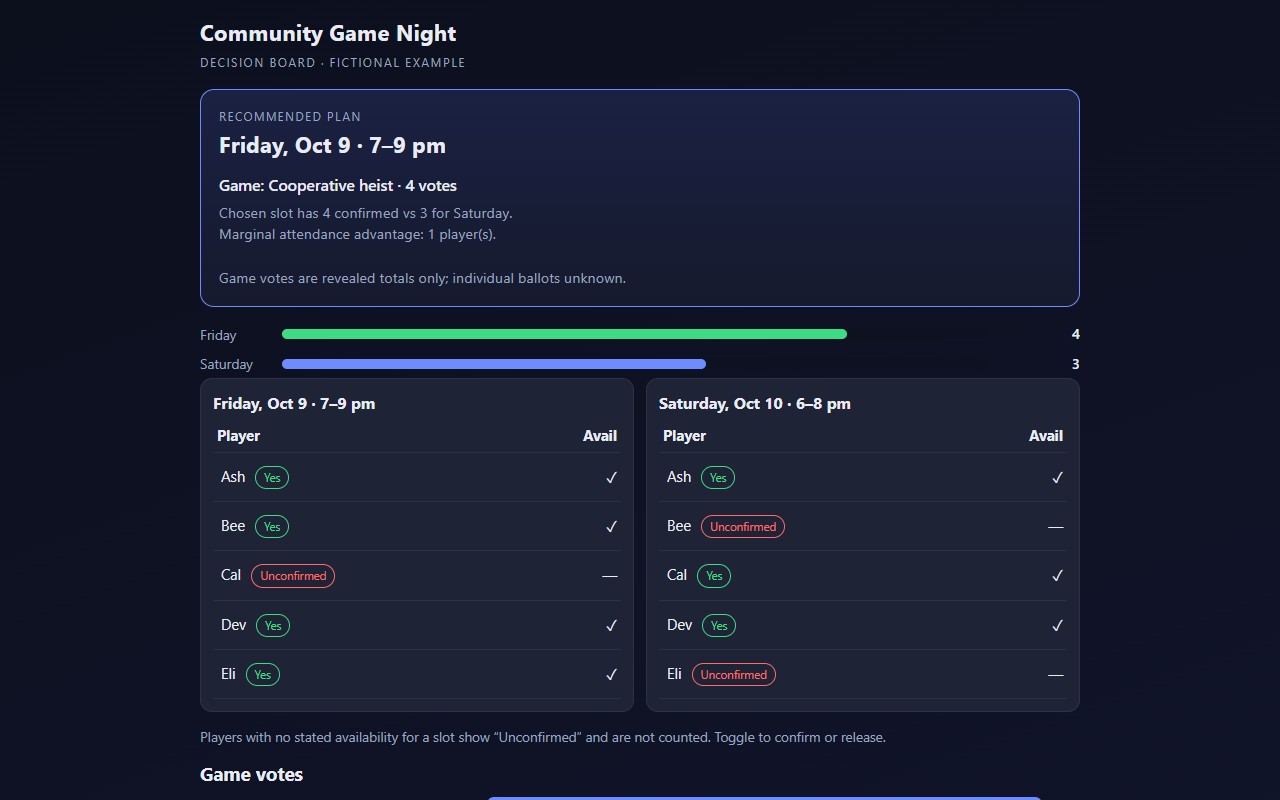
A group question became a tool. Ergod turned availability and game votes into a decision board. Change one person’s Friday availability and the recommendation, the announcement and the printable run sheet update to a tie.
Open the first pass, the revision and the checked final board. The request and the checks are there too.
Recorded in signed-in web Work · 23 Sep 2026 · fictional planning inputs · not a Discord room
More results:Recorded results Community gallery Recorded journeys
Ergod has tools, memory, and a place to work. You bring the reason.
Describe the outcome. Bring a file, a link, or just a question.
Research, code, files, and working pages. Follow the work and open the result.
Ask for a change. Reopen the conversation. Make the next version.
Plans
Make a real result in browser Work on Free. Move up when your projects need more room to work, more ways to work together, or more storage.
$0 / to start
Try a real task. Make a browser Work result like the game-night board above and keep it in your workspace. Your usage allowance refreshes every day.
Start free$9.99 / month
Stay with the build. A rolling 7-day usage pool supports concentrated work when one project takes several asks and revisions.
Choose Pro$19.99 / month
More headroom for it. A larger rolling 7-day pool and 10 GB workspace for sustained work and more files.
Choose Pro+How usage works. Free has a daily allowance. Pro and Pro+ have rolling 7-day pools; capacity returns as earlier work leaves the window. Different models and tools use different amounts, so no plan has a fixed task count. See measured recorded runs →